Try on wedding dresses online
The Mija Loraa virtual try-on: upload a photo, choose up to three dresses from our collection and see how you look in them. Free, in just a few minutes.Upload a photo, choose up to 3 dresses and see how you look in them. Free.
Already have try-ons? See them
- 1PhotoUpload your photo
- 2Choose dressesUp to 3 styles
- 3ResultAI visualisation
Step 1 of 3 · Photo
Upload your photo
Drag your photo hereAdd a full-length photo
JPG, PNG or HEIC · up to 10 MB · min. 1000 px highJPG, PNG or HEIC · up to 10 MB
Your photo is deleted automatically after 24 hours and never used for anything else. FASHN keeps no copy of it and does not use it to train AI models. Details: privacy policy.
Encrypted connection. We never publish your photos. The visualisations are created for us by FASHN LTD in the United Kingdom, which keeps no copy of your photo.
Photo guide
How to take a photo that worksHow to take a good photo
01Whole body in frame
From head to toe, with a little space above your head and below your feet.Head to toe, with a little space around.
02Stand facing the camera
Arms slightly away from your body, feet together, eyes on the lens.Arms slightly out, feet together.
03Close-fitting clothes
Leggings and a fitted top or bodysuit. Avoid wide trousers and coats.Leggings and a fitted top.
04Bright, even light
Daylight falling from the front. Avoid harsh light from behind.Daylight from the front.
05Plain, light backgroundPlain background
A plain wall — no mirrors, furniture or other people in the shot.A plain wall, no mirrors.
06Camera at waist height
Ask someone to take it from 2–3 m away or use the self-timer. No mirror selfies.From 2–3 m away, no mirror selfies.
Examples
Yes — full length, facing forward, plain background
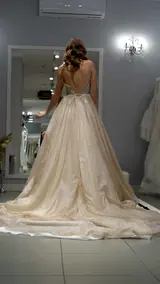
No — back to the camera
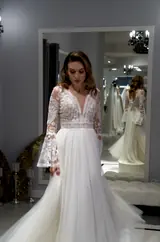
No — legs and feet cut off

